This report is available through Risk management module (that is connected to Silicon Expert to get conformity information in Buymanager). For more information, please see dedicated article here. Reminder : Risk management module is optional and requires an additional licence, please contact our sales team if needed : sales@buymanager.biz This report provides detailed information on RoHS substances following the risk assessment. It includes comprehensive data on SVHCs (Substances of Very High Concern) when their levels exceed the specified limits, as well as any additional RoHS-related explanations. You can export all relevant details from this report for further analysis.
What is RoHS 5/6?
RoHS 5/6 refers to compliance with 5 out of 6 restricted substances under the RoHS directive, with the exception of lead (Pb). Lead is allowed in specific applications for Categories 8 and 9 for a few more years, as detailed in Annex III of the RoHS directive.
How are RoHS and REACH related?
REACH (Registration, Evaluation, Authorization, Restriction of Chemicals) is a regulation that covers the production and use of chemical substances and their impact on health and the environment. Managed by the ECHA, it includes 197 Substances of Very High Concern (SVHC) at present. RoHS focuses specifically on restricting substances in electrical and electronic equipment, such as wiring and circuit boards. In contrast, REACH covers all chemicals used in manufacturing, including those in enclosures, coatings, paints, and solvents. Importantly, all substances restricted by RoHS are also listed in the REACH restricted substances list, which includes chemicals that are carcinogenic, mutagenic, reprotoxic, bio-accumulative, toxic, or endocrine disruptors. For more details, see the REACH Restricted Substances List. The SVHC list under REACH is updated regularly and currently includes over 240 substances.
How to export the RoHS/Reach substances report?
In the Risk page After Search > Get data > Press "ROHS SUBSTANCES" There is a window that will jump up to let you choose a location to save your Excel report file. 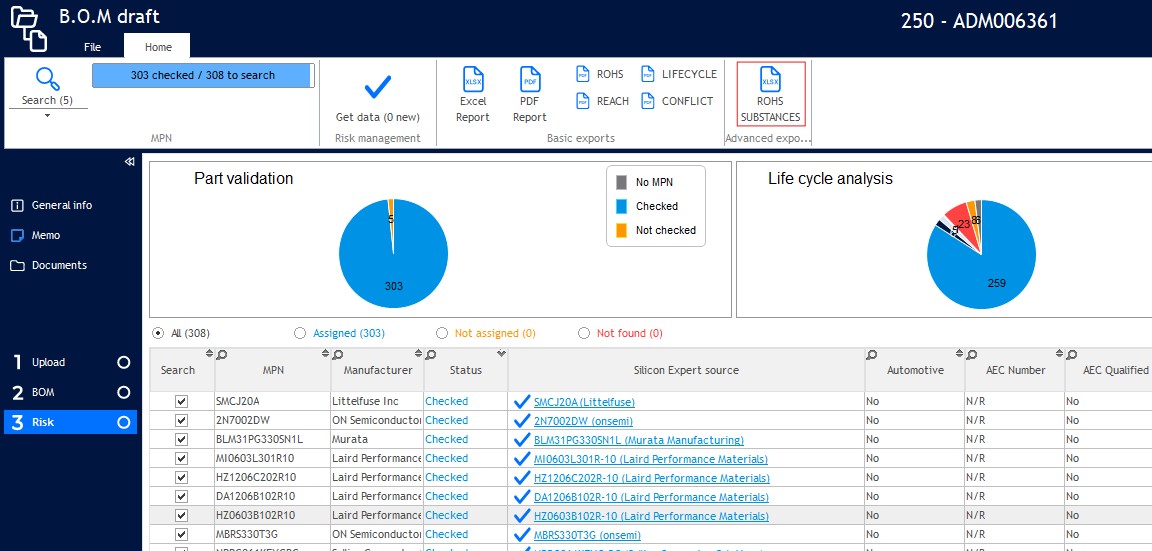
What kind of situation I can get the RoHS/Reach substances report?
Some common situations as below for your example:  Situation 1. The part has RoHS status Compliant, SVHC, and is above the limit you will have all the detailed information (Substance Identification name, Homogeneous Material, Location name...etc).
  Situation 2. The part has RoHS status Not Compliant, SVHC, and is above the limit you will have all the detailed information (Substance Identification name, Homogeneous Material, Location name...etc) But without RoHs Exemption information
  Situation 3. The part has RoHS status Compliant, SVHC but not above the limit, there is not all the detailed information
  Situation 4. The part don't have SVHC, but has RoHS status Compliant, it will have RoHs Exemption information but no not all the detailed information
  Situation 5. The part don't have SVHC, RoHS status is Not Compliant there is not all the detailed information, and without RoHs Exemption information