Goal: Associate each manufacturer company name to a physical manufacturer of the database.
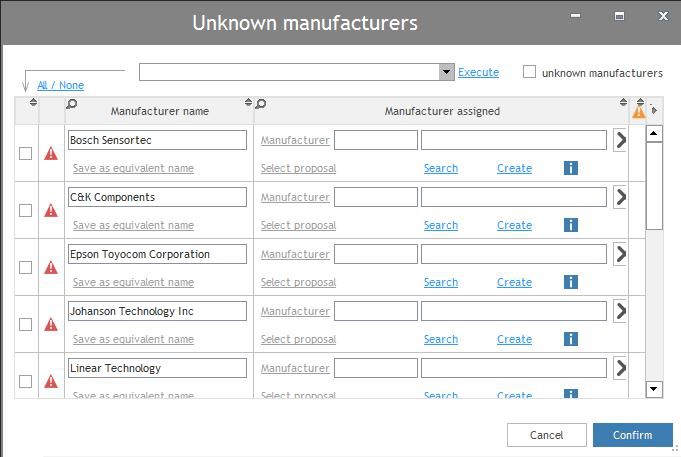
How to solve manufacturer company name
When a company name isn't automatically solved, a specific icon appears You should Search in the database the manufacturer then create a new one if it doesn't exist.
Buymanager Found multiple manufacturers in the database
The option "Select proposal" displayed in blue. Buymanager use to the equivalent name to find manufacturer from the company name uploaded :
- Click on "Select proposal"
- Select the correct manufacturer
- Eventually delete the equivalent name of the wrong manufacturer (Buymanager never show you this manufacturer for the uploaded manufacturer
- Valid

The icon disappear, you are fixed the following manufacturer
Buymanager didn't have a proposal for the upload company name
- Click on "search" to try to find it out from the database
- Modify search text to find the correct one
- Select the manufacturer and valid
The icon disappear. If you wish to save this assignment :
- Click on "Save as the equivalent name"
you could use it to the following manufacturer
The Manufacturer doesn't exist
- Click on create
The icon disappear, you create the following manufacturer
The available name doesn't correspond to a real manufacturer
don't do anything and fill the correct information in the following manufacturer
All manufacturers are solved
- Close the solve manufacturer interface
If you solve manufacturer, Buymanager will learn about your choices and never ask you again in the same case.