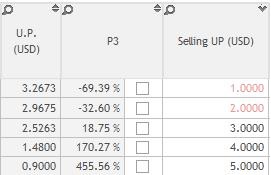
Goal: At Deal costing process step “Mark-up” only at the very end of the costing, when the user is sure of valuation and purchasing prices choices. Therefore, if the user set P3 column as 0% as default and change the selling price, the user could reduce the mistakes for costing.
General settings of the application
- Start Buymanager as an Administrator
- Click on "Application settings"
- Click on Global setting>> Company >> Settings
-
- On "Costing: P3 Activation default value" set it to "Yes"
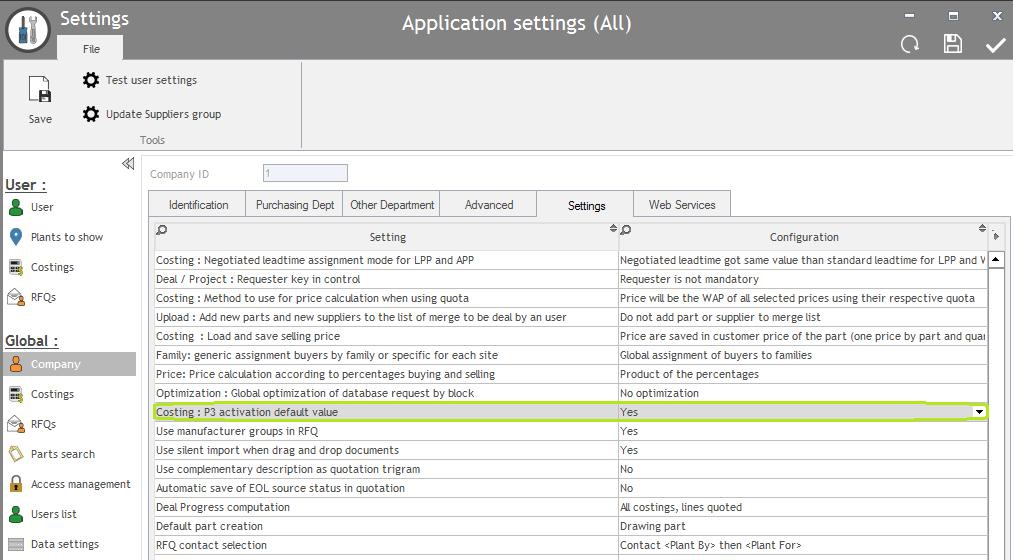
This setting will Lock P3 column as default.
That means the selling price [selling UP(USD)] column it depends on P3 percentage.
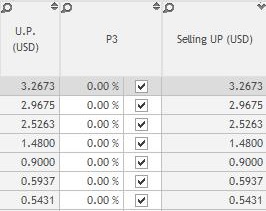
Will load purchasing price [U.P.(USD) column] as default, so the P3 percentage will be 0%.
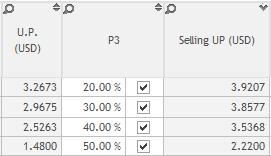
User can change the P3 column percentage to set selling price [selling UP(USD)].
If the user didn't lock the P3 column, will automatically calculate selling price [selling UP(USD)] and purchasing price [U.P.(USD) column] percentage on P3 column.
Set P3 column as 0% by default:
Change P3 percentage:
Without Lock P3 column but selling price have value: