Summary
- How to simplify the formalism of suppliers’ RFQ ?
- How can a supplier propose alternative?
- How to integrate a supplier quote offering alternatives?
How to simplify the formalism of suppliers’ RFQ?
Goal
A few years ago, it was interesting to present suppliers, a structured request for quotation in such a way that the information is the least redundant possible.  Thus the quantities were frequently presented in column Today, following a strong digitization of services, men who quote need input allowing a simple injection into their information processing system. For all these reasons, it is preferable today to send the RFQ to the suppliers in the following form.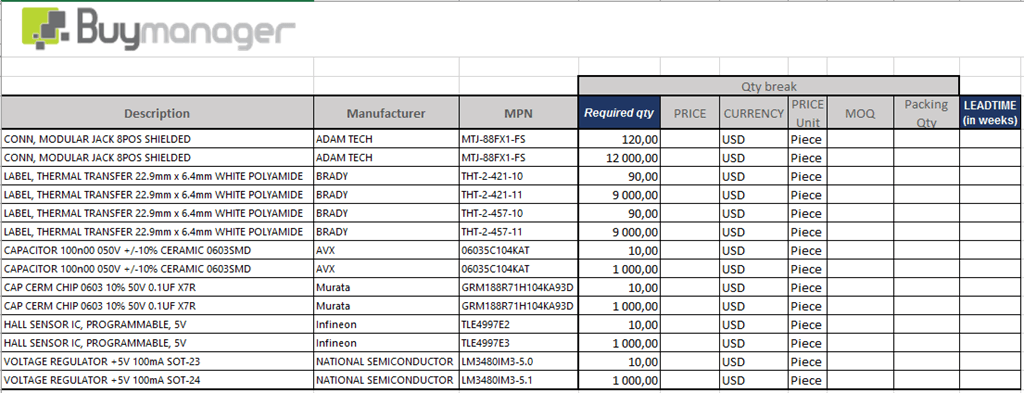
How to do?
- Open the RFQ template you are used to
- Check if your RFQ template is a template presenting the quantities on line or in column
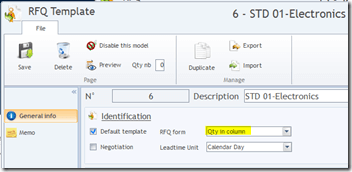
- If the model is already in quantity on line, you have nothing to do your model is ready. Otherwise follow the procedure to turn your model into an on line template
- Duplicate the template to keep your previous template safe.

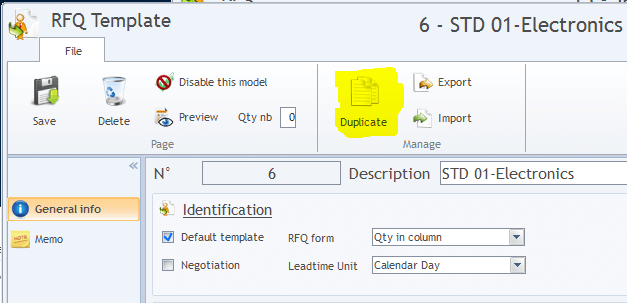
- In the new template >> tab “general info”
- Modify the template name to correctly identify it
- Set the template to be the new default template
- modify The type of presentation of the quantities (Qty in line)
- Delete the grouping header of the repeated information
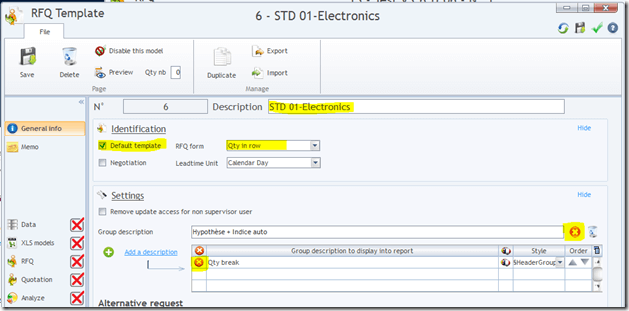
- In the new template >> tab RFQ
- Uncheck all repeated information

- Save and quit


How can a supplier propose alternative?
Goal
Your suppliers may have several reasons for wanting to duplicate quotation lines
- The supplier wants to give you a price on the original source but also on an alternative
- The supplier / manufacturer of drawing parts receives a quotation request for a specific quantity and wishes to return a multiple priced proposal presenting a price according to various launch quantities, various leadtime, etc ...
How to do?
If the supplier wants to quote the original source and an alternative source  The supplier may duplicate the quotation line and inform the tarif by specifying the alternative source If the supplier want to quote a request on a drawing part The Buymanager user can request for a specific quantity. The supplier can duplicate the quotation line at will and modify the various elements such as the quantity which becomes a launch quantity, the leadtime, the price, etc...
How to integrate a supplier quote offering alternatives?
Goal
Re-integrate into Buymanager supplier quotes where suppliers have been able to modify the initial request
How to do?
The quotation upload is identical to previous upload of the previous release of Buymanager V3.6. For the user the operation is transparent. After upload, the quotation will have all the distinct prices offered by the supplier Thus, for the first example: the supplier wants to rate the original source and an alternative source
- Two quotations will be visible in the costing with their different specificities.
For the second example: the supplier wants to quote a request on a drawing part
- As many quotation lines will be visible in the costing as price condition the supplier gives.
De plus en plus de fournisseurs sont amenés à faire des offres de prix sur les pièces sur plan en modulant leur prix en fonction de scénarios de cadencements, de délais, etc... Buymanager enrichit sont processus d'import de cotation fournisseurs afin de tenir compte de cette nouvelle offre fournisseur.