How to Upload supplier quotation not complying with original Buymanager format?
Goal
Even if the RFQ from Buymanager is standardised, Supplier could reply to the RFQ in an Excel file not corresponding to the original entry. Buymanager propose a simple tools allowing user to quickly upload this quid of quotation
How to do ?
In an original RFQ build by Buymanager, two singular elements is mandatory.
- The internal reference which gives the key to access to a specific quotation line (This simple data could be sufficient by itself)
- The part code allows to assign price et its conditions to the concerned part.
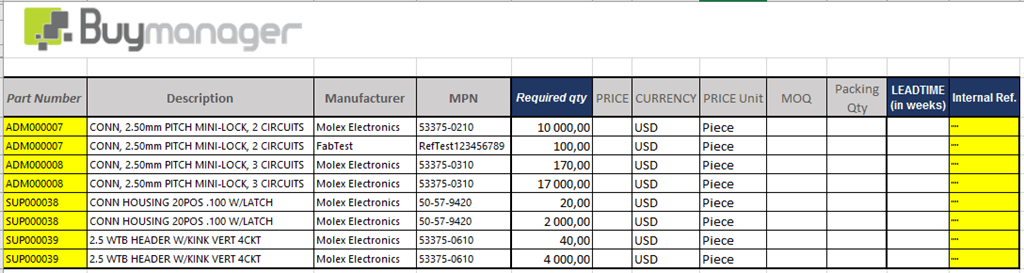 If the supplier reply to the RFQ giving you the information Internal reference or part code, it is possible to upload supplier quotation with the new upload quotation tool like that :
- Open the concerned RFQ >> tab “Quotation”
- Click on “Upload” button
- Select the Excel file containing the quotation returned by the supplier
- Fill in the right supplier and click “OK”
- The new upload quotation tool start
- In the Excel view, select the line containing the column header
- For each field of your RFQ template assign an existing information containing in the supplier quotation
-
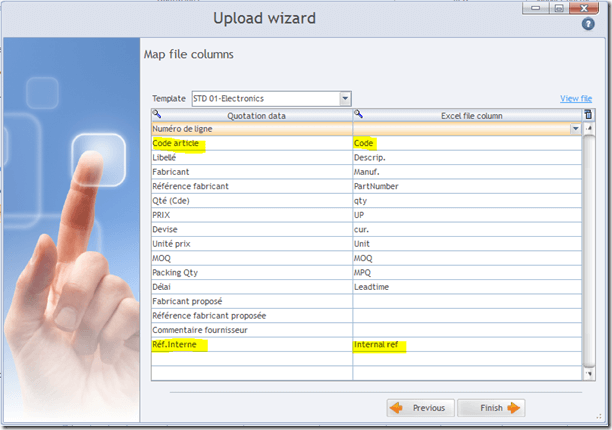
- Internal reference or part code should necessary assign to an existing column of the quotation file
- The sample above refers to the supplier quotation below

- Click on “Finish” button
- The quotation automaticaly upload >> Check if some warning up or if proposed sources are available.


Bien que les fournisseurs arrive dans 90% des cas à renseigner les demandes de cotation dans le formalisme Buymanager, il reste quelques réfractaire qui envoie des offres de prix dans leur propre format Excel. Buymanager se dote d'un outil simplifié permettant le ré-import de ce type de fichier excel afin de répondre à 100% des envois de cotations des fournisseurs.